C:\TBK\REASCRAT\README.TXT






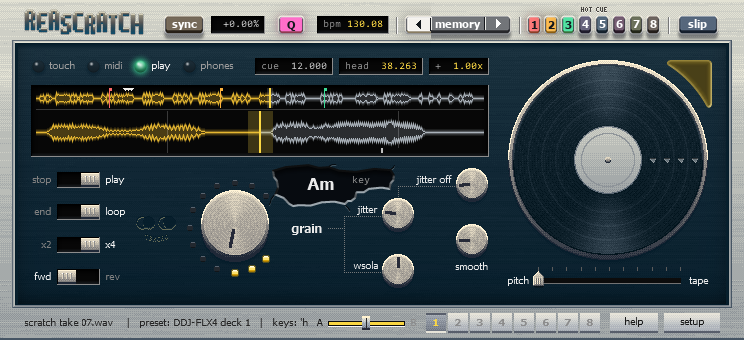
ReaScratch
REAPERで音と映像をスクラッチする無料のキットA free kit for scratching audio and video in REAPER
ReaScratchは、REAPERを音と映像の2デッキのスクラッチ環境にする、無料のJSFXとLuaスクリプトのキットです。DJコントローラーのジョグを回すと、音の高さを保ったままスクラッチでき、REAPERのビデオ画面の映像もコマ単位でついてきます。
GitHubのReleasesから、最新版のZIPファイルをダウンロードできます。ReaPackでも入れられ、新しいバージョンもReaPackで受け取れます(手順は説明書の「セットアップ手順」にあります)。
ブラウザ体験版
音と映像をいっしょにスクラッチできる、ブラウザの体験版です。見本の動画で試せるほか、手元の音や動画のファイルも読み込めます。読み込んだファイルはブラウザの中だけで使い、どこにも送りません。
- パソコン: ChromeかEdge。DJコントローラー(MIDI)もつなげます。
- スマホ: 1デッキの画面になります。Androidでは、ChromeとFirefoxで試しました。Chromeで音が遅れるときは、Firefoxで開いてください。Firefoxで映るのはMJPEGのAVIの動画だけです。Chromeで読み込んで
Save as videoで保存すると、AVIの動画ができます。機種によっては、Firefoxでふつうに再生しているときに小さなプチノイズが入ることがあります。 - iPhoneでは試していません。
- ブラウザ版で使えない機能: コントローラーからの曲の選択・読み込み、REAPERのメトロノームと録音、自分で作ったパターンのファイル。
ReaScratch is a free JSFX and Lua kit that turns REAPER into a two-deck scratch setup for audio and video. You can scratch with a DJ controller’s jog wheel while maintaining the sound’s pitch, and REAPER’s video window follows frame by frame.
Download the latest ZIP from GitHub Releases. You can also install it with ReaPack and get new versions there (see “Setup” in the manual).
Browser trial
A trial version that runs in your browser and lets you scratch audio and video together. Try it with the sample videos, or load your own audio and video files. Files you load stay in your browser and are never sent anywhere.
- Computer: Chrome or Edge. You can also connect a DJ controller (MIDI).
- Phone: Displays a one-deck view. Tested on Android in Chrome and Firefox. If the sound lags in Chrome, open it in Firefox. Firefox only shows video from MJPEG AVI files: load your video in Chrome and use
Save as videoto make one. On some phones, Firefox may add small clicks during normal playback. - Not tested on iPhone.
- Not included in the web version: browsing and loading tracks from the controller, the REAPER metronome and recording, pattern files of your own.
できること
- 2デッキ、クロスフェーダー、ホットキューとメモリーキュー、SLIP、BEAT SYNC、ループ、フィルター
- スクラッチしているあいだも、映像が音についてくる
- DJコントローラーのプリセット(MIDI)と、NI Traktor Kontrol S2/S3/S4のためのHIDブリッジ
- プリセットを手元の機材と照らし合わせたり、新しく作ったりできる画面(setupの
Learnタブ)
動作環境
- REAPER 7.x(WindowsとmacOS)。macOSで動作を確かめたのは初期のバージョンだけで、そのあとに足した機能はまだ確かめていません。
- 基本の機能は、REAPERだけで動きます。FFmpeg、js_ReaScriptAPI、SWSは、なくても動きます(あると使える機能が増えます)。
対応機材
122個のプリセットがあります。実機で確かめたのはAkai APC40 mkIIとReloop Buddyだけで、ほかの機種には⚠が付いています。これらはメーカーのMIDI一覧や有志の割り当てをもとに作っており、実機での確認はまだできていません。
試してくれる人の募集
⚠の付いた機種をお持ちの方は、次の手順で試していただけると助かります。
- キットを入れて、setupで自分の機種のプリセットを選ぶ
Learnタブを開き、案内どおりにつまみやボタンを触る- 結果(✓/✗の一覧、または保存した
.reascratch-presetファイル)と、気になったところ(ジョグの向きや速さ、テンポフェーダーの向き、ボタンの反応など)を、GitHubのIssuesに送る
説明書
説明書はキットに入っています(ReleasesのZIPにも入っています)。
- 日本語: ReaScratch_manual.pdf(14MB)、README_ja.md
- 英語: ReaScratch_manual_en.pdf(14MB)、README.md
ライセンスとクレジット
ライセンスはGPL-3.0-or-laterです。フィルターはSaikeのJSFX(MITライセンス)から、映像のVHSのエフェクトはzhukerのntsc(Apache License 2.0)から移植しました。コントローラーの情報は、Mixxxの割り当て、メーカーのMIDI一覧、SuperXtremeMapper、有志の割り当てをもとにしています。スクラッチをJSFXの中で行うアイデアは、tilrのTIME-1から得ました。くわしくはCREDITS.mdにあります。
ReaScratchは、Claudeに手伝ってもらって作りました。
What it does
- Two decks, crossfader, hot cues and memory cues, SLIP, BEAT SYNC, loops, filters
- The video follows the audio while you scratch
- Presets for DJ controllers (MIDI), plus an HID bridge for NI Traktor Kontrol S2/S3/S4
- A screen to check a preset against your controller or make a new one (the
Learntab in setup)
Requirements
- REAPER 7.x on Windows or macOS. On macOS, only an early version has been tested; features added since have not been tried there yet.
- The basic features need nothing but REAPER. FFmpeg, js_ReaScriptAPI and SWS are optional (they unlock additional features).
Controllers
There are 122 presets. Only the Akai APC40 mkII and the Reloop Buddy have been tested on real hardware. All other presets are marked with ⚠: they were built from manufacturers’ MIDI lists and community mappings, and have not been tested on actual hardware yet.
Testers wanted
If you own a controller marked ⚠, I’d be grateful if you could:
- Install the kit and pick your controller’s preset in setup
- Open the
Learntab and operate the controls as prompted - Send the results (the ✓/✗ list or the saved
.reascratch-presetfile) and anything that feels off (jog direction or speed, tempo fader direction, button behavior) to GitHub Issues
Manuals
The manuals come with the kit (and are in the Releases ZIP).
- English: ReaScratch_manual_en.pdf (14 MB), README.md
- Japanese: ReaScratch_manual.pdf (14 MB), README_ja.md
License and credits
ReaScratch is licensed under GPL-3.0-or-later. The filters are ported from Saike’s JSFX (MIT License), and the VHS video effect from zhuker’s ntsc (Apache License 2.0). Controller data comes from Mixxx mappings, manufacturers’ MIDI lists, SuperXtremeMapper and community mappings. The idea of scratching inside a JSFX came from tilr’s TIME-1. See CREDITS.md for details.
Made with help from Claude.