C:\TBK\TOBOMTR\README.TXT
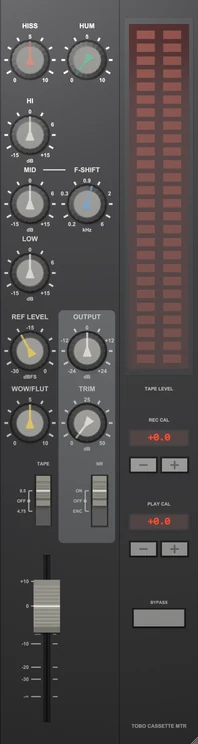
Tobo Cassette MTR
1990年代の4トラック・カセットMTRの1入力ぶんを再現した、無料のVST3プラグインA free VST3 plugin that recreates one input of a 1990s four-track cassette recorder
Tobo Cassette MTRは、Windows用の無料のVST3エフェクトです。1990年代の4トラック・カセットMTRの1入力ぶんを再現します。マイクプリアンプとチャンネルフェーダー、3バンドEQ、MTRのノイズリダクション、そしてテープそのもの(ヒス・ハム・ワウフラッター)までを通します。軽く通せばカセットらしい温かみに、テープを強く押せば潰れたローファイの音になります。
GitHubのReleasesから、最新版のZIPファイルをダウンロードできます。
このプラグインは個人の作品です。どの機材メーカーとも関係がなく、承認や後援も受けていません。
できること
- プリアンプ、チャンネルフェーダー、EQは、MTRの回路図を部品の値ごとシミュレーションしている。EQの効く幅と周波数は、MTRの仕様どおり
- MTRのノイズリダクション(2バンドのスライディング・コンパンダー)。録音のときに音を圧縮し、再生のときに元へ戻す。エンコードしたままデコードしない音も、独特の音色として選べる
- テープの飽和、9.5 cm/sと4.75 cm/sでの高域の落ち方、テープヒス、電源のハム、ワウフラッター
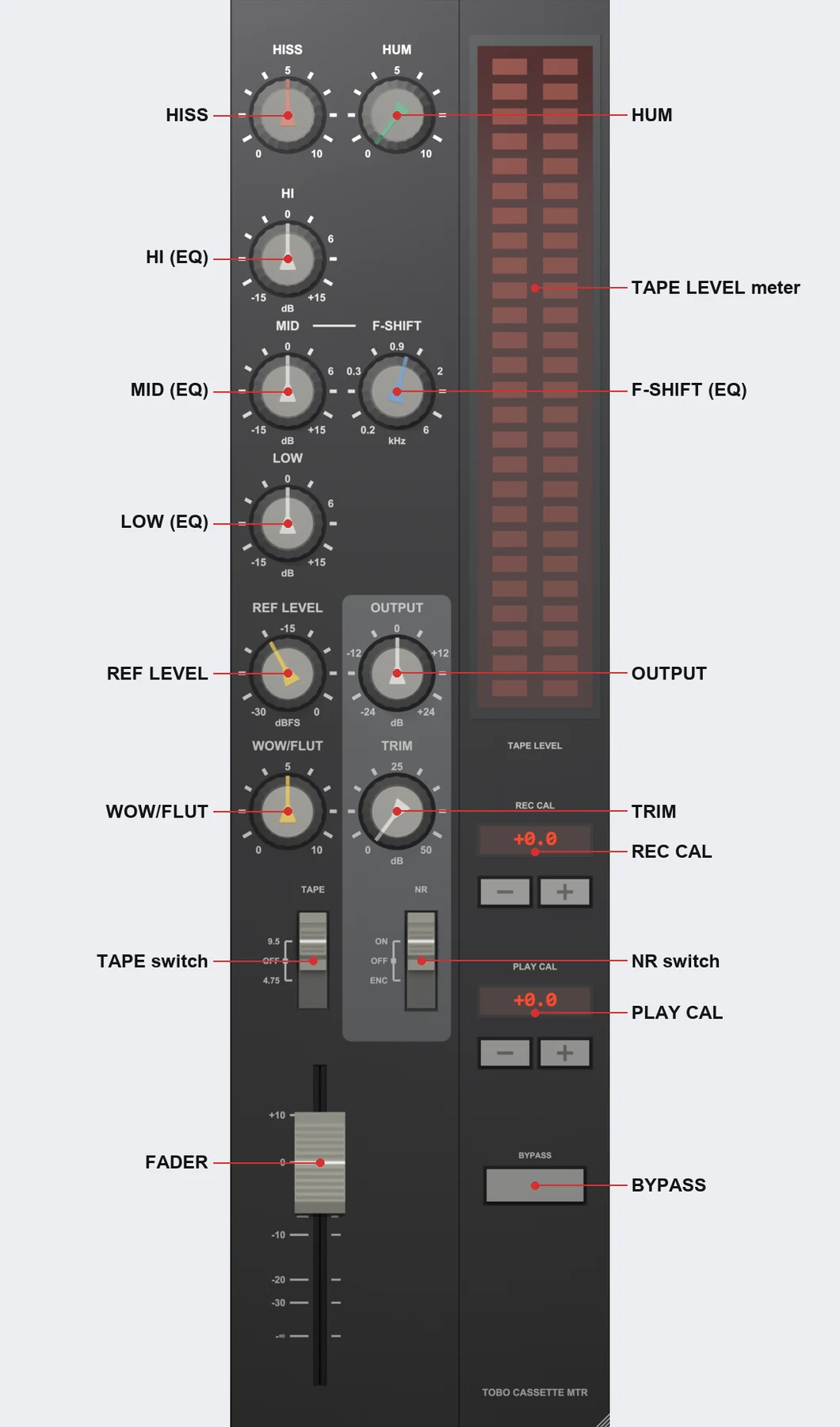
- HISS・HUM・WOW/FLUTは、入り切りではなく量のつまみ。0はなし、5はモデルの量、10はMTRより多い量
- REC CALとPLAY CALで録音と再生のレベルを合わせる。TAPE LEVELメーターで、テープをどれだけ押しているかが分かる
- BYPASSは短いクロスフェードで切り替わる。プチッというノイズは出ない
- 画面の大きさは60〜150%(パネルを右クリック)
- 画面は、このプラグインのためにBlenderで作った3Dモデルの画像。1入力ぶんの操作パネルを真上から見た絵
使いかた
- トラックかバスにTobo Cassette MTRを挿す。初期設定では、プリアンプ・EQ・ノイズリダクション・9.5 cm/sのテープを通り、少しのヒスとワウがかかる
- テープを強く押すには、REF LEVELを左(-30 dBFSの側)へ回す。TAPE LEVELメーターを見ながら合わせ、音量はOUTPUTで戻す
- こもって揺れの大きいテープにするには、TAPEスイッチを下の4.75にする
- HISS・HUM・WOW/FLUTを好みで回す。0にすれば、ノイズと揺れのないきれいなテープになる
- HI・MID(周波数はF-SHIFT)・LOWで音を整える
- BYPASSを押して、プラグインを通さない音と聴き比べる
入れかた
- ZIPファイルを展開する
Tobo Cassette MTR.vst3フォルダーを、フォルダーごとC:\Program Files\Common Files\VST3\にコピーする- DAWでプラグインを再スキャンする
インストーラーも追加のランタイムも要りません。コード署名はしていません。
動作環境
- Windows(64ビット)、VST3、モノラルまたはステレオ
- 確かめたのは、Windows 11とREAPER 7.86(44.1・48・96kHz)の組み合わせだけです。ほかのDAWで動いたかどうか、GitHubのIssuesで教えてもらえると助かります。
- 実機は手元になく、計測はしていません。モデルは、MTRの回路図・仕様・サービス用の調整値と、公開されているテープのデータから作りました。1台の実機の写しではなく、MTRのモデルとして使ってください。
- ヒスはランダムなノイズです。HISSが0より大きいと、同じプロジェクトを書き出しても毎回わずかに違う音になります。
- macOSバージョンはまだありません。
説明書
説明書(PDF)がZIPファイルに入っています(日本語はToboCassetteMTR_manual.pdf、英語はToboCassetteMTR_manual_en.pdf)。GitHubでも読めます。
- 日本語: README_ja.md
- 英語: README.md
ライセンスとクレジット
ライセンスはAGPL-3.0-or-laterで、ソースコードはGitHubにあります。JUCEとVST 3 SDKを使っています。VSTはSteinberg Media Technologies GmbHの登録商標です。使っているライブラリは、CREDITS.mdにあります。
このプラグインは個人の作品です。どの機材メーカーとも関係がなく、承認や後援も受けていません。
Tobo Cassette MTRは、Claudeに手伝ってもらって作りました。
Tobo Cassette MTR is a free VST3 effect for Windows. It recreates one input of a 1990s four-track cassette recorder: the mic preamp and the channel fader, the three-band EQ, the recorder’s noise reduction, and the tape itself, with its hiss, hum, and wow and flutter. Drive it gently for the warmth of a cassette, or push the tape hard for a crushed lo-fi sound.
Download the latest ZIP from GitHub Releases.
This plugin is an independent work. It is not affiliated with, endorsed by, or sponsored by any hardware manufacturer.
What it does
- The preamp, the channel fader and the EQ simulate the recorder’s circuit diagram, with its part values. The EQ’s ranges and frequencies match the recorder’s specifications.
- The recorder’s noise reduction is a two-band sliding compander, with its encoder and decoder. You can also play the tape encoded but not decoded, as a sound of its own.
- The tape has its saturation, its high-frequency loss at 9.5 cm/s and at 4.75 cm/s, its hiss, mains hum, and wow and flutter.
- HISS, HUM and WOW/FLUT are knobs, not just switches: 0 turns them off, 5 is the modeled amount, and 10 is more than the recorder had.
- REC CAL and PLAY CAL trim the record and playback levels, and the TAPE LEVEL meter shows how hard the tape is driven.
- BYPASS switches with a short crossfade, so there is no click.
- The panel scales from 60% to 150% (right-click the panel).
- The panel is a render of a 3D model made for this plugin with Blender: one input strip seen from straight above.
How to use it
- Put Tobo Cassette MTR on a track or a bus. With the default settings the sound goes through the preamp, the EQ, the noise reduction and the tape at 9.5 cm/s, with a little hiss and wow
- To drive the tape harder, turn REF LEVEL to the left (toward -30 dBFS), watch the TAPE LEVEL meter, and bring the level back with OUTPUT
- For a darker, wobblier tape, move the TAPE switch down to 4.75
- Turn HISS, HUM and WOW/FLUT to taste; turn them to 0 for a clean tape
- Shape the sound with HI, MID (with F-SHIFT) and LOW
- Click BYPASS to compare the sound with and without the plugin
Install
- Extract the ZIP file
- Copy the entire
Tobo Cassette MTR.vst3folder toC:\Program Files\Common Files\VST3\ - Have your DAW rescan for plugins
No installer or extra runtime is needed. The plugin is not code-signed.
Requirements
- 64-bit Windows, VST3, mono or stereo
- Tested only on Windows 11 with REAPER 7.86, at 44.1, 48 and 96 kHz. If you try it in another DAW, I’d appreciate it if you could let me know on GitHub Issues how it worked.
- The recorder itself was not available to measure. The model is built from its circuit diagram, its specifications and its service adjustment values, and from published data for the tape. Treat it as a model of the recorder, not as a copy of one unit.
- The hiss is random noise. Two renders of the same project differ slightly when HISS is above 0.
- There is no macOS version yet.
Manuals
The manuals are in the ZIP file as PDFs (ToboCassetteMTR_manual_en.pdf in English, ToboCassetteMTR_manual.pdf in Japanese). You can also read them on GitHub.
- English: README.md
- Japanese: README_ja.md
License and credits
Tobo Cassette MTR is licensed under AGPL-3.0-or-later, and the source code is on GitHub. It is built with JUCE and the VST 3 SDK. VST is a registered trademark of Steinberg Media Technologies GmbH. The libraries it uses are listed in CREDITS.md.
This plugin is an independent work. It is not affiliated with, endorsed by, or sponsored by any hardware manufacturer.
Made with help from Claude.