C:\TBK\TOBOIMG\README.TXT
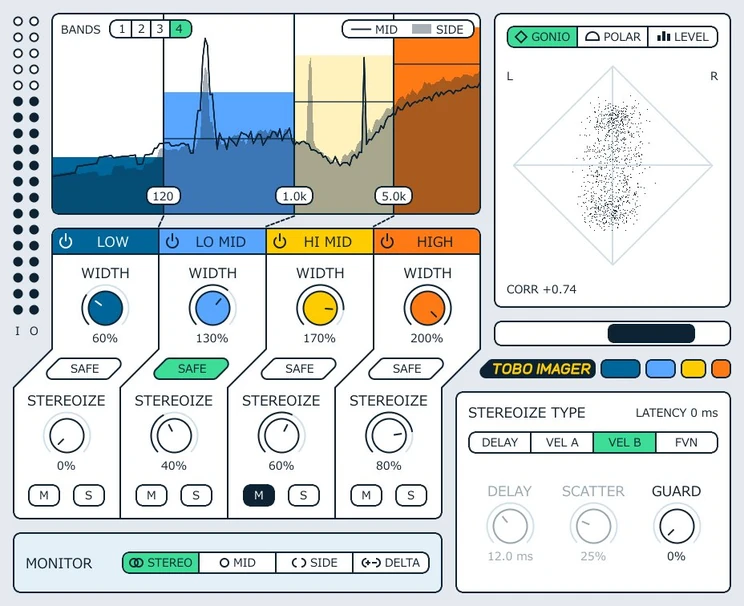
Tobo Imager
帯域ごとに音の広がりを決める、無料のステレオイメージャーA free stereo imager that lets you adjust the width of each frequency band
Tobo Imagerは、Windows用の無料のVST3エフェクトです。音を最大4つの帯域に分け、帯域ごとにステレオの広がりを決められます。モノラルの音を広げること(ステレオ化)もできます。広げた音をモノラルに足し合わせても、入力をモノラルにしたときと同じスペクトルになります。
GitHubのReleasesから、最新版のZIPファイルをダウンロードできます。デモ動画では、3種類の音で、4小節ごとにプラグインのオフとオンを切り替えています。
できること
- 帯域は1〜4つ。境目は、スペクトルの上でドラッグして動かす
- 帯域ごとのWIDTH(0〜200%)とSTEREOIZE(0〜100%)
- ステレオ化の方式は4種類: DELAY、ベルベットノイズのVEL AとVEL B、オールパスフィルターのFVN
- どの設定でも、ミッド(左右を足した音)のレベルは変わらない
- SAFE: 帯域のサイドをミッド以下に抑え、相関が0より下がりにくくする
- GUARD: 音の立ち上がり(アタック)を中央に残し、そのあとに続く音だけを広げる
- 帯域ごとのソロとミュート、ミッドだけ・サイドだけ・設定で変わった分だけの試聴
- スペクトル、3種類のステレオメーター(GONIO・POLAR・LEVEL)、相関の表示
入れかた
- ZIPファイルを展開する
Tobo Imager.vst3フォルダーを、フォルダーごとC:\Program Files\Common Files\VST3\にコピーする- DAWでプラグインを再スキャンする
インストーラーも追加のランタイムも要りません。コード署名はしていません。
動作環境
- Windows(64ビット)、VST3、ステレオ入出力
- 確かめたのは、Windows 11とREAPER 7.85、48kHzの組み合わせだけです。ほかのDAWで動いたかどうか、GitHubのIssuesで教えてもらえると助かります。
説明書
説明書(PDF)がZIPファイルに入っています(日本語はToboImager_manual.pdf、英語はToboImager_manual_en.pdf)。GitHubでも読めます。
- 日本語: README_ja.md
- 英語: README.md
ライセンスとクレジット
ライセンスはAGPL-3.0-or-laterで、ソースコードはGitHubにあります。JUCEとVST 3 SDKを使っています。VSTはSteinberg Media Technologies GmbHの登録商標です。ステレオ化の方式のもとになった論文は、CREDITS.mdにあります。
Tobo Imagerは、Claudeに手伝ってもらって作りました。
Tobo Imager is a free VST3 effect for Windows. It splits the sound into up to four frequency bands and lets you adjust the stereo width of each band. It can also widen a mono sound (stereoize), and the mono sum of the output keeps the same spectrum as the mono sum of the input.
Download the latest ZIP from GitHub Releases. The demo video turns the plugin off and on every four bars across three sounds.
What it does
- One to four bands; drag the crossovers on the spectrum display
- WIDTH (0–200%) and STEREOIZE (0–100%) for each band
- Four stereoize types: DELAY, velvet noise (VEL A and VEL B), and an all-pass filter (FVN)
- No setting changes the level of the mid (the sum of left and right)
- SAFE: keeps a band’s side at or below its mid, so its correlation is less likely to drop below 0
- GUARD: keeps attacks in the center and widens only what follows
- Solo and mute for each band; listen to the mid alone, the side alone, or only the difference made by your settings
- Spectrum display, three stereo meters (GONIO, POLAR, LEVEL), and a correlation meter
Install
- Extract the ZIP file
- Copy the entire
Tobo Imager.vst3folder toC:\Program Files\Common Files\VST3\ - Have your DAW rescan for plugins
No installer or extra runtime is needed. The plugin is not code-signed.
Requirements
- 64-bit Windows, VST3, stereo in and out
- Tested only on Windows 11 with REAPER 7.85 at 48 kHz. If you try it in another DAW, I’d appreciate it if you could let me know how it worked on GitHub Issues.
Manuals
The manuals are in the ZIP file as PDFs (ToboImager_manual_en.pdf in English, ToboImager_manual.pdf in Japanese). You can also read them on GitHub.
- English: README.md
- Japanese: README_ja.md
License and credits
Tobo Imager is licensed under AGPL-3.0-or-later, and the source code is on GitHub. It is built with JUCE and the VST 3 SDK. VST is a registered trademark of Steinberg Media Technologies GmbH. The papers behind the stereoize types are listed in CREDITS.md.
Made with help from Claude.